

Ok, I got the cooler and I believe this model will be actually the third cooler I have tested from the company.
So far I’ve tested Gelid Tranquilo and Gelid GXt which were nice and really good coolers and I am really eager to see if this one will show the same quality and performance.

The cooler arrived in a pretty standard for the company carton box painted in various colours forming the typical Gelid colour scheme. Of course, on the front side of the box there is a full picture of the product and some compatibility details, while the full technical details for this product are on the side panels and the back panel of the box.

Now let’s take the cooler out of its package and check all of the features that it has to offer.

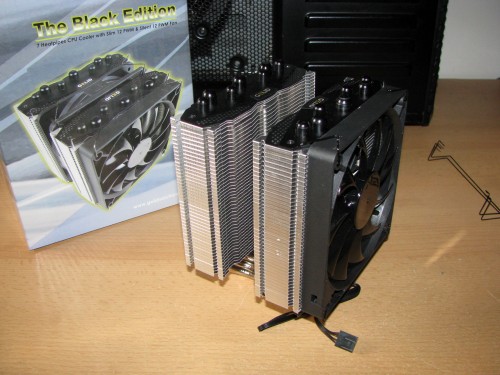
After I opened the box I saw the small carton box on top and the cooler inside that foam bed protecting the structure from any damage. For now I will leave the carton box aside and check the cooler itself. After I removed the foams the model looked like that:

The cooler arrived pretty much assembled and with a carton piece between the towers just to keep everything in place. To describe the model in the best way I have to remove all parts and check them one by one.

The cooler itself is with dimensions of 109(l) x 126(w) x 160(h) mm including the fans and overall weight of 990 grams including the fans. Gelid The Black Edition is made of two types of components which I want to describe in this article:
The heatsink

The heatsink itself is made of 3 very interestingly designed components:
1. A very wide contact surface made of copper but the most interesting thing is that the part contacting with the processor is without nickel layer probably for better heat transfer.

2. The second part of the heatsink are actually the heatpipes which for this product are arranged in 2 levels, a technology used in GX7 too and proved as very effective. Gelid The Black Edition offers 3 x Ø8mm copper with nickel plate heatpipes in middle of the contact surface and 4 x Ø6mm copper with nickel plate heatpipes next and above the Ø8mm heatpipes. All of them are soldiered to each other and to the contact surface.

3. The aluminum fins for this model are structured as 2 thin towers with 25mm distance between them and in that spot a 120mm fan can be installed.

Maybe you’ve already noticed that even though the aluminum fins are very similar the two towers are not exactly symmetrical. The heatpipes of the right tower are actually bent a bit more to the left just to make sure the cooler doesn’t cover the DIMM slots.

Yes, the towers are thin but still very wide and are able to hold 120mm fans for dissipating the heat.

Gelid Solutions designed the towers entirely of aluminum fins with nice black finish on top by adding an additional cover for the fins and the heatpipes in black.

According to the official technical details for the product, this model is suitable to be used with all of the processors from these sockets:
Intel™ Socket 775, 1155, 1156, 1366 & 2011:
CPU: All Pentium D/ Pentium 4/ All Celeron D/ All Pentium Dual-Core/ Extreme/ All Core 2 Extreme/ Core 2 Quad/ Core 2 Duo, Core i5, Core i7
AMD™ Socket AM2/ AM2+/ AM3/ AM3+/ FM1/ FM2:
CPU: All Athlon 64 X2, Athlon 64, All Athlon II, All Sempron, Phenom, Phenom II, All A Series AMD APU Llano
The fans:
After I described the heatsink itself now is the time to share some details about the fans used to cool the heatsink.

The cooler arrives with 2 x 120mm fans and the option to install a third one:
1. Gelid Slim 12 PWM with dimensions of 120(l) x 120(w) x 15.8(h)mm – providing airflow level of 89.1 cubic metres per hour working with 750 – 1600 revolutions per minute with static pressure of 1.35 mmAq at maximum noise level of 25.4 dBa.
2. Gelid Silent 12 PWM with dimensions of 120(l) x 120(w) x 25(h)mm – providing airflow level of 98.6 cubic metres per hour working with 750 – 1500 revolutions per minute with static pressure of 1.6 mmAq at maximum noise level of 25.5 dBa.
Both of the fans are painted entirely in black and are powered and regulated by 4-pin PWM cables. Both of the fans can be installed at same motherboard fan connector using a Y-PWM splitter. They are attached to the towers via metal clips again painted in black. And this is how the cooler looks with all parts installed.

Before I continue with the tests I want to describe the the additional accessories provided in the small white carton box I showed at the start of the article:

The standard package contains:
- 3 sets of fan clips for installing 3 fans on the cooler
- A combo backplate needed to install the cooler on Intel and AMD systems
- Mounting brackets for Intel
- Mounting brackets for AMD
- A lot of screws, bolts and nuts for installing the mounting brackets to the motherboard
- A GC-Extreme thermal compound
- A Y-PWM splitter
- A user manual
To keep the tradition, before I move on to the test results, I would like to describe the system, used for the test:
CPU: AMD Athlon X4 620 at standard frequency of 2612 MHz and overclocked at 3640 MHz (at 1.5V) per core for the tests.
Motherboard: GigaByte 790X-UD3P
Video card: Sapphire 5830 Extreme 1GB DDR5 256bit
Memory: 2 x 2GB Apacer 800 MHz
Hard drive: Kingston SSD SV100S264G
Case: Cooler Master HAF 932
Power supply: Cooler Master Silent Pro 600
Cooler: Gelid The Black Edition
Thermal paste: Gelid GC-Supreme
Fan mounted: The standard 120mm fans from the package
The tests were conducted in a closed system with:
- 230mm fan on the front panel putting fresh air in and spinning at about 700 rpm
- 230mm fan on the side panel putting fresh air in and spinning at about 700 rpm
- 230mm fan on the top panel taking hot air out and spinning at about 700 rpm.
- Room temperature of about 18 degrees.
Testing procedure:
I will install Gelid The Black Edition and do tests at default frequency 2612 mHz at idle and stress and at overclocked frequency of 3640 mHz again at idle and stress using just the standard 120mm fan included in the package.
Mounting procedure:
To install the cooler on the motherboard I had to use all of these parts:

To install the cooler I had to remove the standard plastic bracket provided with the motehrboard and backplate and use the accessories provided by Gelid. And this is how they look.

And with the cooler installed:

Even though the right heatpipes were bend a bit to the left we can see that the 4 DIMM slots are available only for memories without tall heatsinks. And this is how the cooler looks inside the case:

Here are the results from the tests:
The results from the tests at default frequency 2612MHz are:
Idle:

Stress:

The results from the tests at overclocked frequency 3640 MHz are:
Idle:

Stress:

All of the test results have been summed up in the following charts:

And the fan speed during the tests:

So seems that the new model is performing very well 🙂
Before I finish the article I believe it is time to share my conclusions:
- Gelid The Black Edition performance – Gelid The Black Edition is somehow a bit smaller than the very well-known two tower coolers that have been released for the past 2-3 years on the market by many manufacturers and brands . The model offers very innovative features such as the 2 row type heatpipes with different diameter for optimal performance and I really like the idea of bending the right tower to the left to avoid DIMM blockade and accordingly the option to use all 4 DIMMs. I can say to Gelid – really good job with this model offering very good performance for its size. I can recommend it to be used for all kind of purposes and I am 100% sure it will handle them. Now imagine its performance with 3 fans installed. Yes… scary!
- Gelid The Black Edition noise level – the model was a bit noisy since the fans were rotating at max speed of ~1600 revolutions per minute and still much more silent than many other products which require fans to rotate at 2000 revolutions per minute for the same performance. Still when the fans are PWM-controlled the cooler is really quiet.
- Gelid The Black Edition appearance – I can say that Gelid The Black Edition is a really stylish and good looking product offering black/grey colour scheme which will stay neutral in every modern build or even modding project.
Before I finish the article I want to say one thing that I see as a disadvantage… The metal clips for the fan between the towers were a bit tricky to install especially when the motherboard with the cooler is already inside the case. Of course with some practice it wasn’t so hard.
According to my review, I’ve decided that Gelid The Black Edition deserves the following reward:

Official price (MSRP): Gelid The Black Edition – unknown
Warranty: 60 months
I thank Gelid Solutions for the test sample.


I have no idea how it will perform with Intel since I am always AMD user, but you can check on other web pages or blogs.
Gelid Black Edition is awesome cooler but still is much smaller and cheaper than NH-D14.
Very nice performance for such cooler. Any idea how this will run with a 4.0 or 4.2 OC?
I’m asking because I’m still looking for a cpu cooler for my i7 920 D0 at 4.0 on air.
Hitting 74 degrees now on BF3 full features on. Still inclined towards the Noctua NH-D14…..
If you don’t measure idle temperature, witch IMO are totally useless, you can use the A8. Just load temps measured with the package sensor, should be just enough.
No, he don’t need an Intel, because I already have it. 😀 The Black Edition made me pleasantly surprised with the supplied accessories and its small dimensions for a double tower design. But I’m thinking now, how the cooler performs with two and three 120x25mm fans?
You need an Intel. 😀
I have the processor(AMD A8-5600k), the motherboard(ECS a85F2-a Golden) and the rams(2x4GB Geil Black Dragon) and I cant use them for now because the softwares doesnt measure the temperatures right.
I even overclocked it from 3600 to 4500 without any problem and without knowing the temperatures.
You sure got it fast. 🙂 I think you need a hotter processor for those tests, this is not hard to cool anymore. 🙂